





98.7% Of all customers recommend us, we're so confident about our results we publish all reviews and stats
View Live Stats View Reviews


Call us on 0207 987 3777 or Search our website
Here are the RSS feeds for www.stl-training.co.uk:
| Feed | Icon | Description |
|---|---|---|
| Microsoft Office hints and tips: |  |
Or choose a specific application feed from hints and tips |
| Blog: | |
Our Microsoft Office training blog |
| Low fill courses: | |
Courses on which you can receive an additional discount |
| Freelance vacancies current work: | |
Freelance trainers can see what current work we have available |
| Articles: | |
Articles on developing Soft Skills, features of Microsoft Office products & other software |
| Case studies: | |
Case studies for past bespoke and tailored training events |

RSS (Rich Site Summary) is a format for syndicating news and the content of news-like sites. It's not just for news. Anything that can be broken down into individual items can be syndicated via RSS. For example:
Once information about each item is in RSS format (usually XML), an RSS-aware program can check the feed for changes and react to the changes in an appropriate way.
A news aggregator or RSS reader (for example your Google personalised home page) can help you keep up with all your favourite weblogs by checking their RSS feeds and displaying new items from each of them.
You can find out more about RSS at WhatIsRSS.com
Around our site you may notice RSS buttons like these:
This means you can subscribe to the live feed of the dynamic content of the
page.
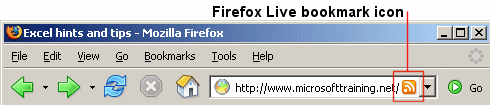
For newer versionf of Firefox, you may need to enabled the 'Subscribe' toolbar button. Go to Options -> Customise to find this button, and drag it to your toolbar.
For older versions of Firefox, when viewing a page with an RSS feed in Firefox, an RSS icon will appear at the end of the address bar.
Clicking this icon or the toolbar button allows you to add a Live Bookmark. Once you've done this, check your bookmarks folder or menu. You should see the feed's title, followed by the latest items of the feed. Clicking the item's titles will take you straight to the content on the web.
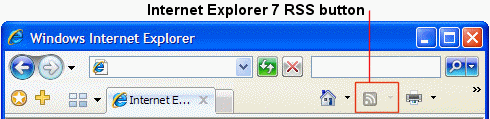
When viewing a page with an RSS feed in Internet Explorer 7, the orange feed icon will illuminate on the toolbar. Clicking this icon allows you to subscribe to the feed.
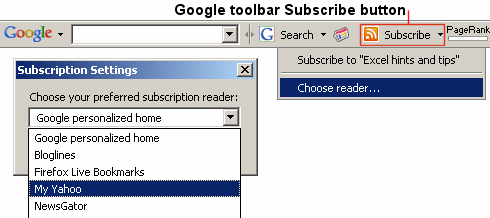
If you have the Google toolbar installed, you can use the 'RSS subscribe' button to add the feed to your favourite RSS reader. If you can't see the subscribe button, click on google toolbar 'options' button, ensure you're on the 'browsing' tab, then tick the box next to the 'subscribe button' logo.
Another way to save or view an RSS feed is to click the icon.
This will display an XML output of the feed. You can then copy and paste
the URL of the feed into your favourite browser or RSS reader. Alternatively,
right click the icon
and choose "Copy shortcut" or "Copy link location".

TrustScore
4.9
/ 5
2084 reviews




Formerly Best Training
© 2024 . All Rights Reserved.
All prices offered for business users and exclude VAT. E&OE
2nd Floor, CA House, 1 Northey Street, Limehouse Basin, London, E14 8BT. United Kingdom
We'll call during UK business hours
Server loaded in 0.03 secs.
